An example of two themes, the original Zoa theme, and an initial theming proposal for Glowb, based on their brand guidelines (illustrative UI—the app redesign was still in progress)
Context
Zoa, the consumer platform for next-gen energy companies, is a spin-off of Bulb, a former energy company I've worked at. When Zoa was starting out, we had Bulb's tech and people, and to make the tech available to others, we needed to white-label our products. White labelling was new to the Zoa team, our existing design system didn't to support it, so themeability became one of the most important problems to solve.
Research
My team carefully assessed whether we could use an existing product that offers themeability, but eventually agreed on building our own.
To start with, we needed a new design system foundation, and the solution was design tokens.
I've started with a design systems analysis. I’ve looked at 12 design systems, including our own, to compare, to see how they define design tokens, what types of design tokens they have, do they have multiple levels of design tokens, their naming structures, and whether they offer theming.
On top of the analysis, I've learned a lot from various articles and videos, of which the most notable are the two Schema by Figma talks from Atlassian and Asana, and Nathan Curtis’s Naming Tokens in Design Systems article. These helped a lot in understanding how useful design tokens are, and what goes into building out a naming structure.
Exploration
I've started the exploration phase with the colour tokens. I’ve grabbed a couple of our new designs (we were going through a rebrand and redesign at the time) and tried applying a token name to every colour style using an initial set of colour naming blocks, while leaving notes in places where the colour logic would need to be refined in collaboration with the respective designers.

Examples of assigning colour token names in the initial stage of the exploration
I came up with the first naming structure proposal after several iterations based on collaborative sessions with designers and engineers. It was important to me to ensure that the logic and terminology make sense to everyone.
Next, I’ve started working on the typography tokens. Based on our new typography styles and designs, I’ve come up with two versions, the difference being the level at which to control the differing design needs of our internal and external products, token or theme. Together with the engineers, we decided to create two sizing themes rather than adding the complexity to the tokens.
Then came the spacing, size, and shape tokens, but I've left other token explorations for later when more styling decisions would be ready.
Design tokens
So, what are design tokens? Design tokens are the smallest recorded design decisions in a design system. They replace hard-coded and non-semantic values to support the consistency, scalability and theming of a design system’s visual style, and they also act as the single reference point for designers and engineers.
While at Zoa, I’ve introduced two levels of design tokens, Core and Alias, and two sizing themes, Roomy and Compact.

Examples of a button background referencing a static value versus an alias token (which references a core token and in turn a static value)
Core design tokens
The most fundamental design decisions were grouped in the core token set. This set includes all available style options in the design system. They usually reference static values, but they can reference other core tokens as well.
Core design tokens were available for: colour palette, typography, shapes (corner), spacing and sizing. These could be referenced in Alias tokens or used as they were if they didn’t relate to more specific Alias tokens. Their names could contain information about where they should be used, in what context and about their scale.
The naming system prioritised flexibility, predictability and simplicity to enable the team to create concise token names that were easily themeable.

Core colour token naming blocks and a colour palette matching the colour variant naming blocks
Alias design tokens
The more complex design decisions, built on top of the core tokens, were the alias tokens, which systematised the design decisions for specific contexts. Their names are more specific than core token names, they could contain a second level of property and scale information and also information about concept (e.g. cta, interactive, etc.), variant (e.g. success, danger, etc.) and interaction (e.g. hover, interactive, etc.).
Alias tokens were available for colour and typography.

Alias colour token naming blocks
Colour accessibility
The colour tokens were designed to meet WCAG 2.2 colour contrast accessibility standards.
The tonal colour palettes were created based on the OKLCH colour space, which is hue uniform, meaning the compatibility of the 13 tones is the same for any chroma and hue combination. This enabled the team to create reusable accessible colour combinations.

Colour compatibility grid based on the WCAG 2.2 specifications
Sizing themes
I created two sizing themes within the Zoa theme to control spacing, sizing and typography: Roomy and Compact.
The Roomy theme was designed for Consumer Apps products, which tend to be less information-heavy than Supplier Tools products and don’t have to condense a lot of information in one view. These products are often used at smaller breakpoints and require a minimum of 16 px base for default sizing.
The Compact theme was meant to be used in Supplier Tools products, where users benefit from a compact treatment of the UI, which can fit more content in a view. The Zoa Supplier Tools products were designed for desktop only and could have a base for default sizing that’s smaller than 16 px.

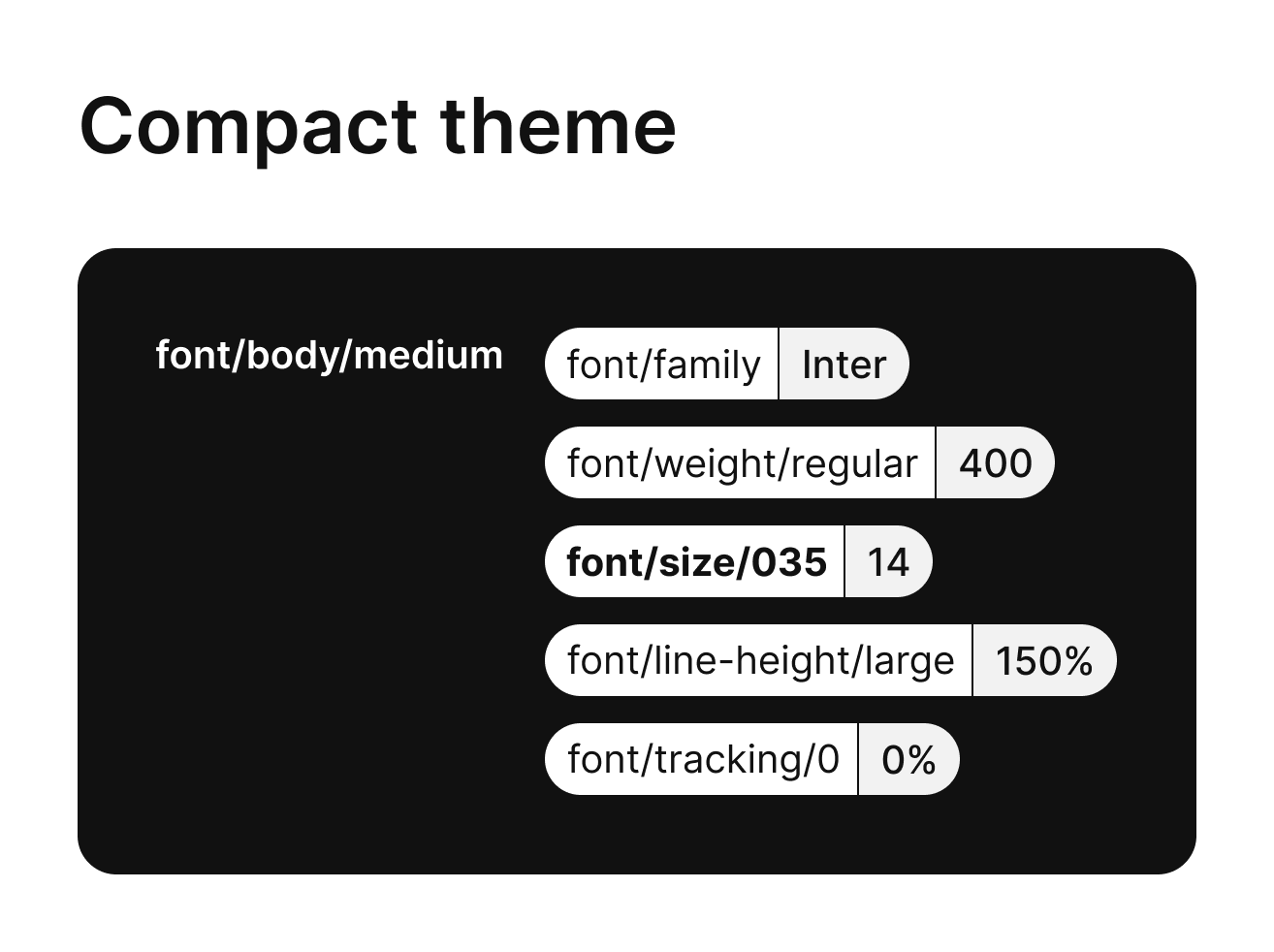
Example of an alias token in two different sizing themes
Design tools
I've used the Tokens Studio for Figma plug-in first, and later, once they were available, the Figma variables and modes features too. Using the Figma features was easier for the wider design team, however, we still used the plug-in for the typography design tokens, as typography variables weren't supported by Figma at the time, and to sync the design token updates to GitHub.
Results
Introducing design tokens to the design system enabled Zoa to create themes for its customers quickly and reliably. By updating the Figma variable modes based on a customer's design resources, we could test new themes in just a couple of hours, and send out personalised proposals promptly.
Alongside the new design system foundation, I've also redesigned some of the old design system components and added 14 new ones.