project name

Growth at Bulb

role

Research, design

date

2020-2022

Bulb was a green energy company with around 1.5 million customers before its collapse during the UK energy crisis. As the sole designer in a cross-functional team, I've contributed to many improvements to the Join flow, in times reacting to business priorities and energy regulator requirements, while other times proactively working on updates based on usability and accessibility issues, and research results.

project name

Growth at Bulb

role

Research, design

date

2020-2022

Bulb was a green energy company with around 1.5 million customers before its collapse during the UK energy crisis. As the sole designer in a cross-functional team, I've contributed to many improvements to the Join flow, in times reacting to business priorities and energy regulator requirements, while other times proactively working on updates based on usability and accessibility issues, and research results.

project name

Growth at Bulb

role

Research, design

date

2020-2022

Bulb was a green energy company with around 1.5 million customers before its collapse during the UK energy crisis. As the sole designer in a cross-functional team, I've contributed to many improvements to the Join flow, in times reacting to business priorities and energy regulator requirements, while other times proactively working on updates based on usability and accessibility issues, and research results.

Three Bulb Join flow question examples.
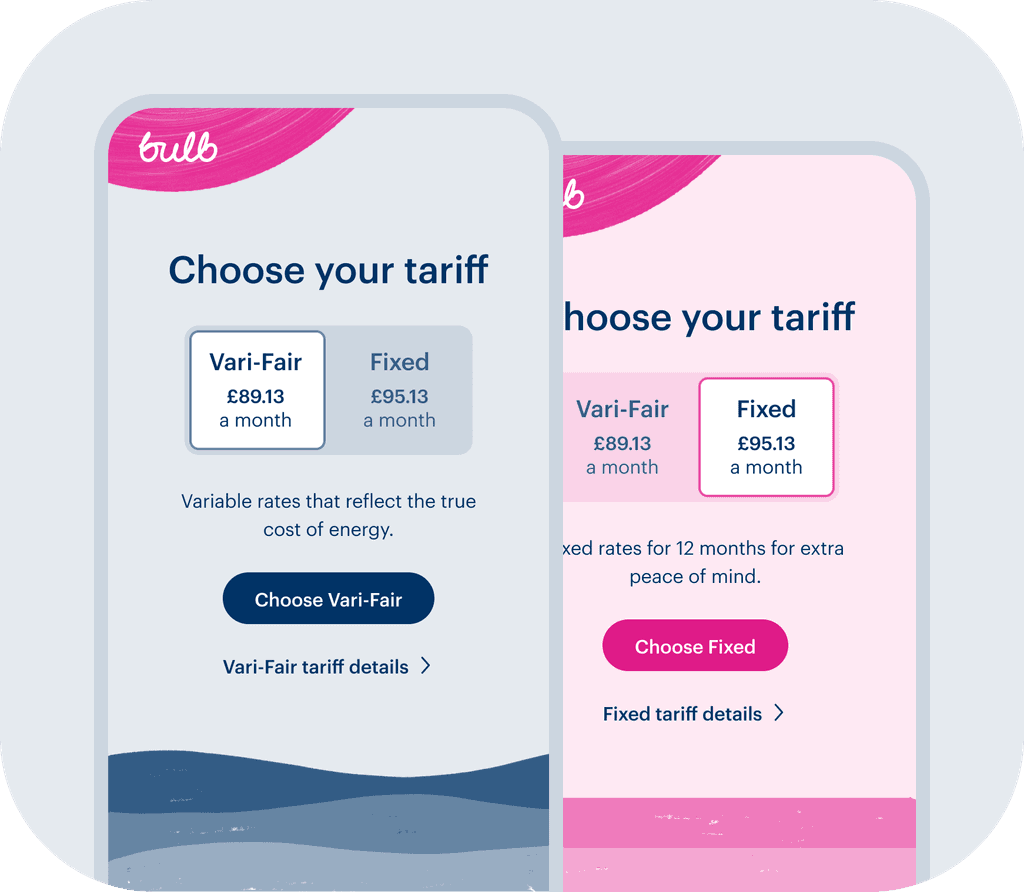
Two mobile previews of a quote page showing the two options that can be viewed and chosen by using a switch.
Two Bulb join flow checkout previews, one with expanded and one with collapsed checkout summary
A preview of the Bulb Join flow welcome page

From left to right, top to bottom:

  1. Join flow question examples

  2. Join flow multi-tariff quote

  3. Join flow checkout summary

  4. Join flow welcome page EV tariff variation

From top to bottom:

  1. Join flow question examples

  2. Join flow multi-tariff quote

  3. Join flow checkout summary

  4. Join flow welcome page EV tariff variation

Context

The Join flow was a combination of quoting and checkout flow variations. It was used by and customised for people switching to Bulb, moving into a property supplied by Bulb, or taking Bulb with them to a new property. It had both self-serve and sales versions, for residential and business properties.

Selected Join projects
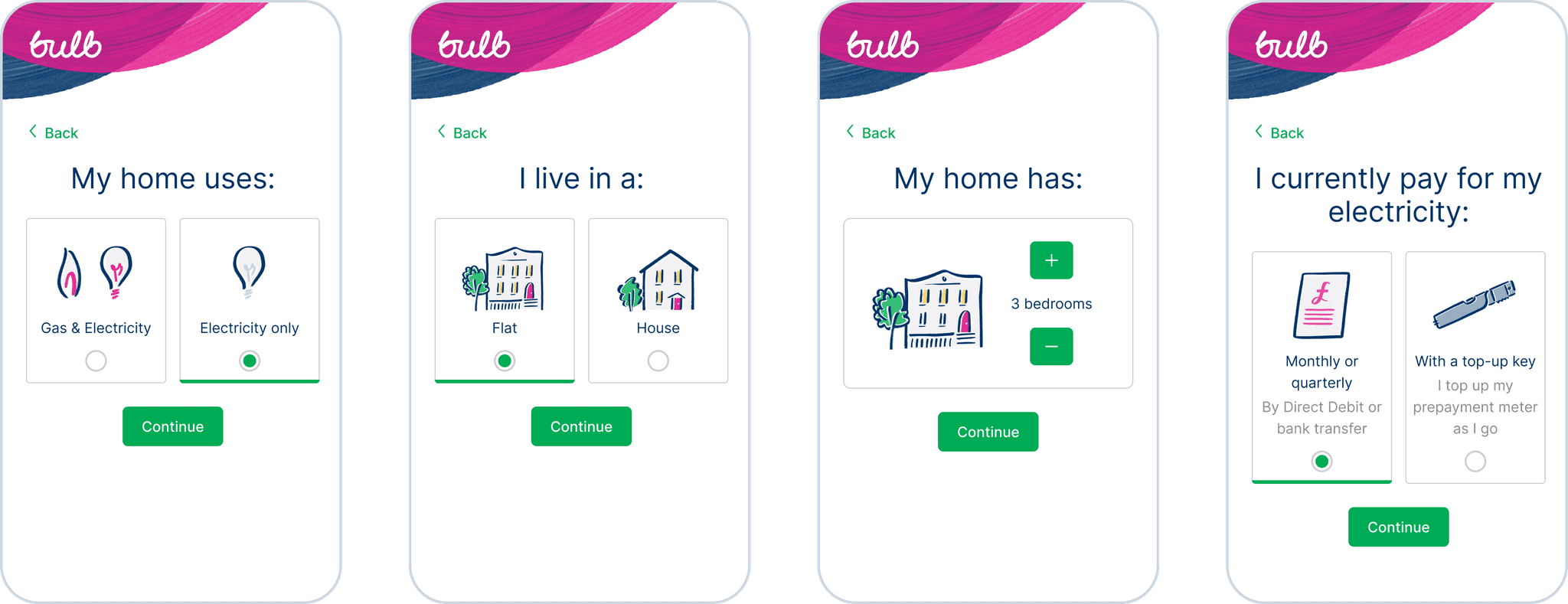
I've selected three of my Join projects to demonstrate how the product evolved during my time working on it. Below is an example of the domestic self-serve flow from before.
Four mobile previews of old Join question flow pages, each page has the header with the Bulb logo, a back button, a page title, the first one is ‘My home uses:’, selectable cards with the available choices, all of them with illustrations, one of the pages has a stepper instead of selectable cards, to increase or decrease the number of bedrooms a home has, and lastly a ‘Continue’ button
Four mobile previews of the old Join flow: one of the quote page, with a yearly savings estimate at the top, a monthly cost breakdown table, a primary ‘Join Bulb’ CTA, a secondary ‘Refine your quote’ button link, a bulleted list using checkmarks, including related information, there’s another main CTA at the bottom, a Trustpilot and an energyswitch guarantee graphic, and a ‘Get this quote by email’ link; two checkout pages, with summary boxes at the top, the first page has two sections: ‘Your information’ and ‘Create your Bulb account’, the second one has one: ‘Payment details’; and a welcome page with a congratulatory title at the top, and illustration of a hugging house, a card for support services, a ‘What happens next’ tracker, and a ‘refer a friend section

Join flow questions, quote, checkout, and welcome page designs, as they were when I started working at Bulb

Smart Pay As You Go

Context

The first big update to Join that I was part of was the introduction of a smart pay as you go (PAYG) tariff paired with the ability to run credit checks and take security deposits.

Design sprint

With seven weeks to go until the launch, and many unanswered questions, our team planned a 5 day design sprint to accelerate the work.

During the design sprint, I've worked with a content designer to create a Figma prototype that catered to all the new design needs and included other general design updates to test at the end.

Smart Pay As You Go design sprint solution sketch of a reimagined quote page, with restructured information hierarchy and more distinct sections

My solution sketch from the Smart PAYG design sprint

Results

After the design sprint, I've refined the design based on the usability test insights and stakeholder feedback.

We've updated existing questions to include Smart PAYG specific options, and we highlighted safety concerns for those eligible to make sure they only choose it if it's safe for them.

Two mobile previews of the Smart Pay As You Go tariff specific safety questions: ‘Do you have any medical or mobility needs that mean your electricity must stay on?’, and ‘Can you safely access your electricity meter?’, both with accompanying illustrations and ‘Yes’ and ‘No’ button links

Smart PAYG tariff specific safety questions

We've improved the quote page design by adding new content based on our test insights, making it easier for users to find information by grouping content into new distinct sections, and moving parts of the information to other pages where it was more relevant.

Part of the new design was implemented separately, after it won against the control in a split test, replacing the long, indistinct list under the quote breakdown.

Mobile preview of the old quote page with information buried in a bulleted list
Mobile preview of the new quote page with information grouped in distinct sections

Old quote page, on the left, updated quote page design on the right

We’ve also updated the checkout flow to include new credit checking and security deposit pages, alongside the added ability to change between tariffs depending on eligibility.

To enable security deposits, we’ve added card payment to the checkout. Following usability guides, we’ve matched the card field sequence to the physical card sequence, and we’ve added helper illustrations, 1 for Amex cards and another for all other cards, to the security code field.

Card payment component with security code helper text and illustration

Card payment component with security code illustration

Going electric

Context

Bulb launched a new smart tariff, with cheaper rates at night, designed to save electric vehicle (EV) owners money.

Design sprint

The team working on Join decided to run a 4 day design sprint to speed up the process of adding the new EV tariff to the Join flow. During the design sprint, the cross-functional design sprint team worked closely together to learn about the new EV tariff, create and test a prototype, and gather insights.

EV tariff in Join design sprint solution sketch of an EV specific question page, with the title ‘How many miles do you drive a year?’ followed by a dynamic illustration, a range slider and an input field option; the top part of a quote page, with a quote per mile and per month, and three main selling points, and the top part of a welcome page with an EV specific illustration and the ‘What’s next’ section pulled to the top

My solution sketch from the EV tariff design sprint

Competitor review

After the sprint, I've also conducted a competitor review, where I've analysed the EV quote flows of 9 competitors and the type of EV tariffs they offered, which I've presented to stakeholders together with the proposed quote flow.

Results

Working in close collaboration with a content designer, I've updated the design sprint prototype based on the combined research insights.

We've added 3 new questions to the quote flow, for eligible users, to help them understand if the new EV tariff is right for them.

Mobile previews of three EV tariff specific questions: ‘Do you have an electric car?’, with ‘Yes’ and ‘No’ options, ‘How often do you charge your car at home?’ with three options: ‘All the time’, ‘Often’ and ‘Hardly ever’, and ‘Can you charge your car between 2am and 6am?’, with ‘Yes’ and ‘No’ options.

New Join flow questions to help determine whether the EV tariff is right for the user

We've also updated the quote page, checkout flow, and the welcome page to accommodate new EV tariff specific information.

Below is a comparison of the old and updated welcome page, with extra sections, that I've added later, for a product offer and the Bulb Carbon Calculator product.

Mobile preview of the welcome page with a congratulatory title at the top, an illustration of a hugging house, a card for support services, a ‘What happens next’ tracker, and a ‘refer a friend section
Mobile preview of the new EV tariff specific welcome page with a congratulatory title at the top, an illustration of a smiling house looking at the car charging outside, a section about the Bulb app, with download links, a section about support services, a bulb app product offer and a carbon calculator section

Old welcome page design, on the left, updated EV tariff specific welcome page design, with extra Bulb app, product offer, and Carbon Calculator sections, on the right

From single tariff to multi tariff

Context

Previously, Bulb only offered variable tariffs and quoted the most fitting tariff to the user based on their energy meters and/or their answers to pre-quote questions.

Due to record-high wholesale prices during the energy crisis, it wasn't viable anymore for energy companies to offer variable tariffs to new customers. Prompted by this pressure, Bulb started to explore fixed tariffs and multi-tariff quotes. This work affected all of the Bulb products and required collaboration between most teams.

Competitor review

I've conducted a competitor review looking at the sign-up flows of 10 energy companies, including Bulb. In the review, I've compared the suppliers across 3 categories—pre-quote, quote, and post-quote—, 28 points in total.

The findings were presented to all stakeholders and informed the design and content explorations.

Explorations

We've explored 2 different ideas: offering 3 tariffs per quote, a variable, a fixed and a fixed one with extras, and offering 2 tariffs per quote, a variable and a fixed tariff, with an optional add-on for extras.

I've identified key information to be included, and I've mocked up multiple low-fidelity layout options for both ideas, which I shared regularly with the stakeholders and the wider design team for feedback. The mock-ups below are a small fraction of the explored options.

Low fidelity multi-tariff quote layout explorations: tariff stack, separate add-on page, and highlighted tariff options
Low fidelity multi-tariff quote layout explorations: a tariff card stack, where the front one partly covers the one behind, a tariff toggle, and a tariff switch button

Multi-tariff quote layout explorations

With the update of the top part of the quote page design, I was also able to convince stakeholders of two smaller updates that we couldn't prioritise before.

One of those changes was updating the Join flow header to take up less vertical space and give way for key info to be visible above the fold.

Previous Contentsquare analytics data backed the need to update the Join header. The exposure rate was especially poor on the quote page and post-quote pages. On the quote page, only 83% of mobile users were exposed to the main CTA—Join Bulb.

Old mobile quote page with overlayed exposure rate data. Here’s ome of the data: 96.8% on the quote breakdown, 83% on the main CTA, 67.5% on the tariff details, 33.3% at the bottom of the page.

Old quote page with overlayed exposure rate data

The other small update was moving down the back button from the top of the page, aiding in winning a bit more vertical space, but also in making the quote look cleaner and more focused.

This change was backed by an observation from various user testing sessions where most participants used the browser navigation for going back in a web flow, and some participants even struggled finding the back button on the pages.

Three different mobile previews of the Join quote page, comparing what’s visible above the fold, on iPhone 6/7/8, on old and new designs and with different header elements. The first one is of the old design with a tall logo header and a ‘Back’ button below, part of the main content and the main CTA is below the fold, the second one is of a new design, with a smaller logo header and a back button below, on this one the the main content, including the main CTA is above the fold, the third one is the same as the second one, except there’s no ‘Back’ button, winning even more space for the main content

Comparing what’s visible above the fold, on iPhone 6/7/8, on old and new designs and with different header elements

In addition to the quote page design updates, I've tested a new checkout summary design, to solve the problems observed with it, also reinforced by Contentsquare analytics data.

On mobile, exposure rate started dropping at the second input field, showing that the summary pushed the forms out from above the fold, and click recurrence on the summary box was high, showing interest or annoyance with it, proving that it didn't contain the information users were expecting.

Three different mobile previews of the Join checkout ‘Your information’ page. The first one is of the old design with a summary box which is pushing the main content out from above the fold, the other two is of the new design with an expandable summary on the top right of the page, collapsed on one preview and expanded on the other, when collapsed it doesn’t take up extra vertical space.

Old checkout summary on the left and updated checkout summary design on the right

Usability testing

I've created a high-fidelity Figma prototype for online usability testing, which was tested with 5 participants. Working with a content designer we both hosted some of the 30 minute sessions, and together we've gathered and presented our findings.

Result

Working with a content designer and an illustrator, I’ve designed 11 variants in total for both multi-tariff and single-tariff Join quotes. The new tariff looks were implemented consistently throughout our products.

A desktop and a mobile preview of the top of the multi-tariff quote page. On desktop there’s the title ‘Choose your green tariff’ and two tariff cards, side-by-side, with tariff name, monthly cost, description, CTA, and a link to more details. On mobile there’s the title, a switch with tariff names and monthly cost,

Tariff cards on a wide screen and a tariff switcher on a narrow screen

Create a free website with Framer, the website builder loved by startups, designers and agencies.